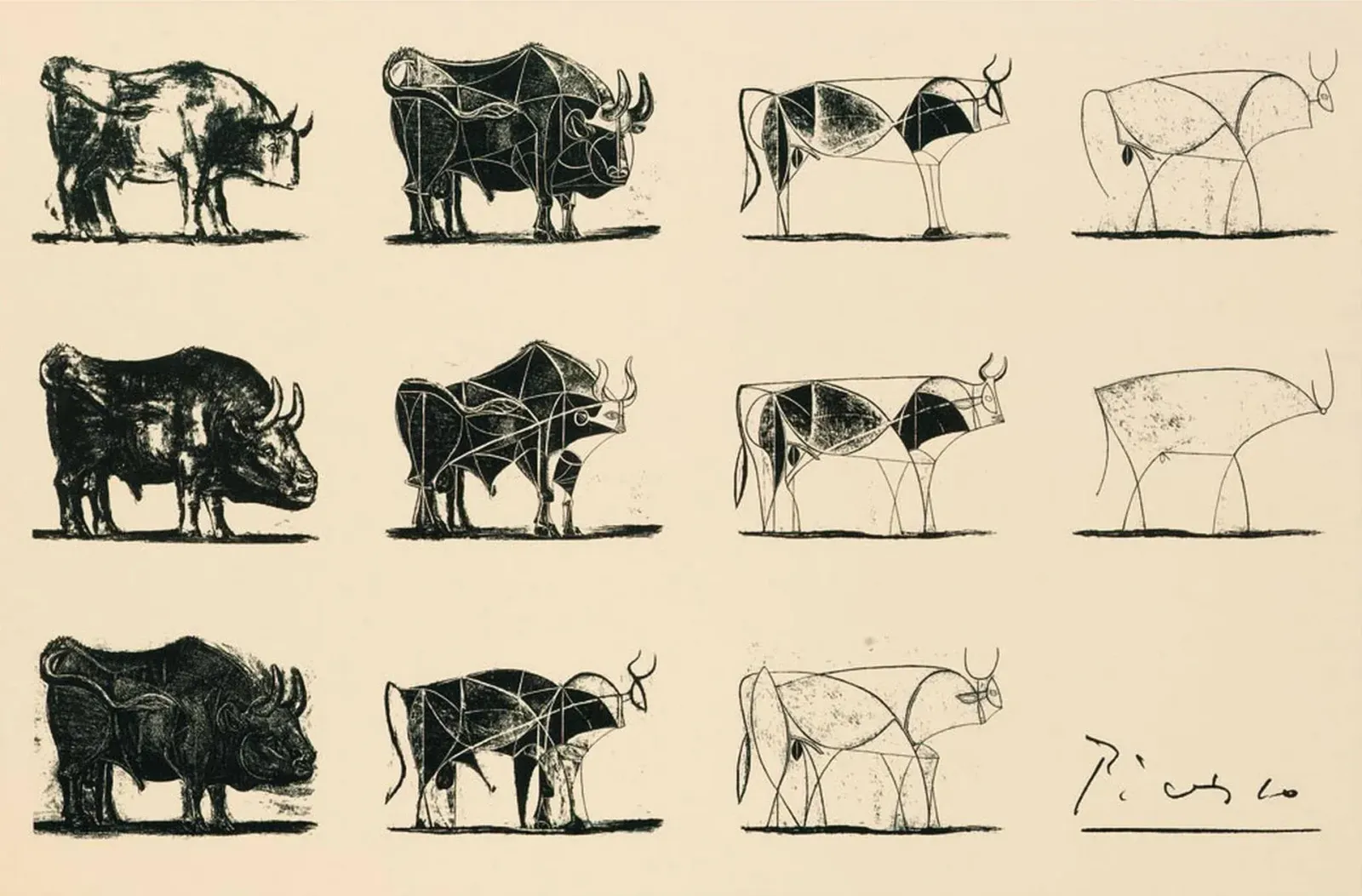
The great master Pablo Picasso is famously attributed with saying:
"It took me four years to paint like Raphael, but a lifetime to paint like a child."
His work, Le Taureau (The Bull), captures this beautifully. Across 11 iterations, Picasso progressively stripped away the details of a bull until only a few lines remained. Yet the bull was unmistakable.
In my journey of learning to build AI agents, I can relate. It has come full circle.
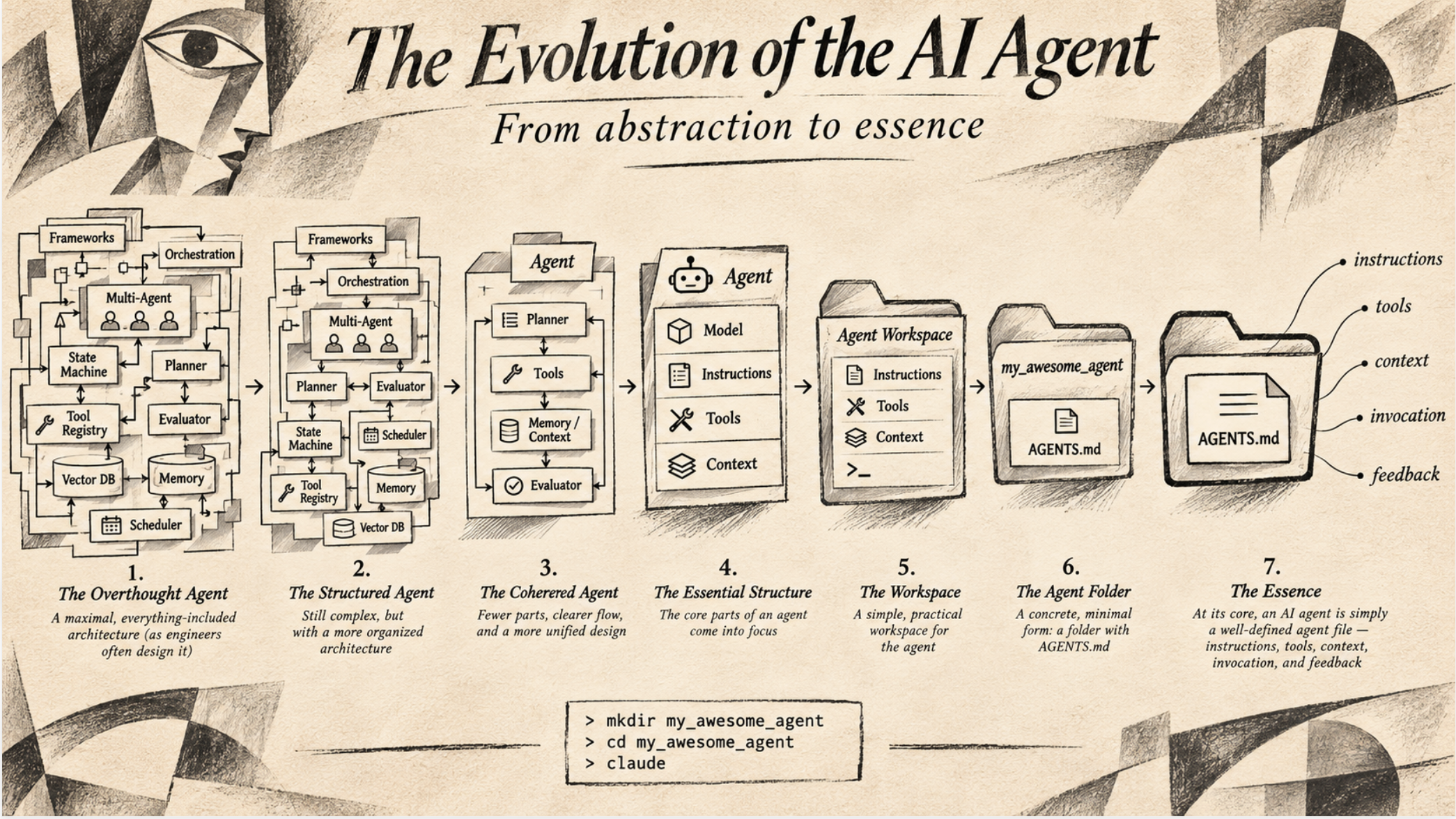
Like many engineers, I started with abstractions and sophisticated software systems. Frameworks, orchestration engines, multi-agent architectures, state machines, vector databases, memory systems, and elaborate planning mechanisms.
The more I experimented, the more I found myself stripping things away.
The models were getting better. More things worked with a single prompt. But that wasn't the whole story. I had been overcomplicating things.
This is now my workflow.
I open my terminal.
mkdir my_awesome_agent
cd my_awesome_agent
claude
and start a conversation.
"Claude, I want to build an agent that does XYZ. Help me initialize it. Create an AGENTS.md and let's figure out what else it needs."
I work through a few questions with Claude.
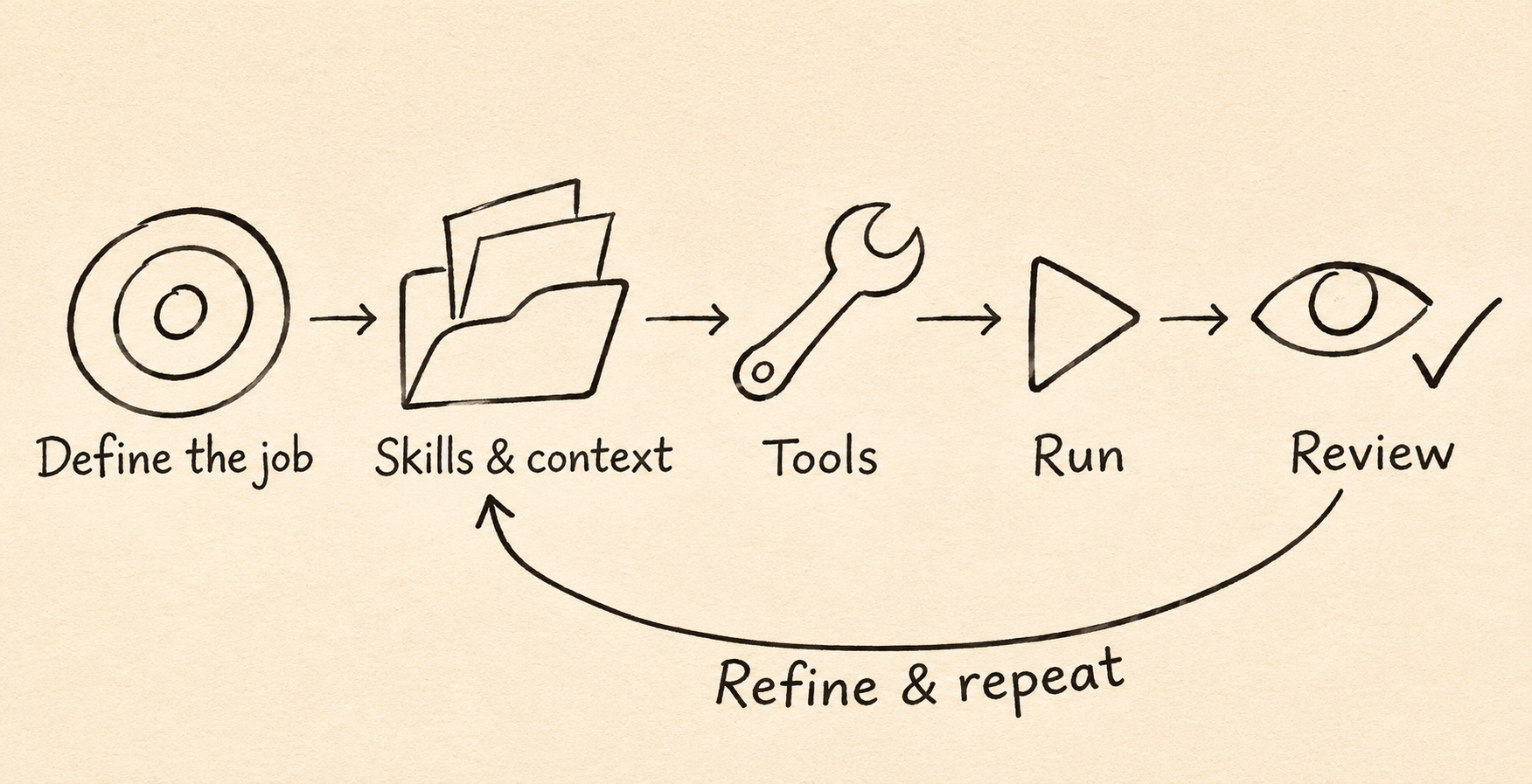
What is this agent supposed to accomplish?
What is the actual job? Not what framework to use, unless you're creating a framework. What does success look like? What decisions can the agent make independently? What should it never do without permission?
What skills does it need?
Skills are specialized instructions that can be reused and remixed. There are plenty of excellent examples on the internet. Borrow them, adapt them, combine them, or ask Claude to create new ones.
Often, a skill is simply a Markdown file with instructions and perhaps a few supporting resources.
What context does it need?
The agent will need context: what your business does, who your customers are, how your codebase works, or some domain-specific knowledge. These can all live as Markdown files inside the folder. Some context can be retrieved when needed. Some comes from the conversation itself. You don't automatically need a vector database or a sophisticated memory architecture.
What tools does it need?
To perform a job, an agent needs tools. Maybe it needs to search the web, read a database, call an API, execute a script, or interact with a browser.
Introducing a tool is as simple as enabling a plugin or adding an MCP connector.
I ask Claude to help identify the smallest set of tools required to accomplish the task. A tool could even be created dynamically, with the agent writing and invoking code. The agent could also find tools on the internet and install them.
How does the agent get invoked?
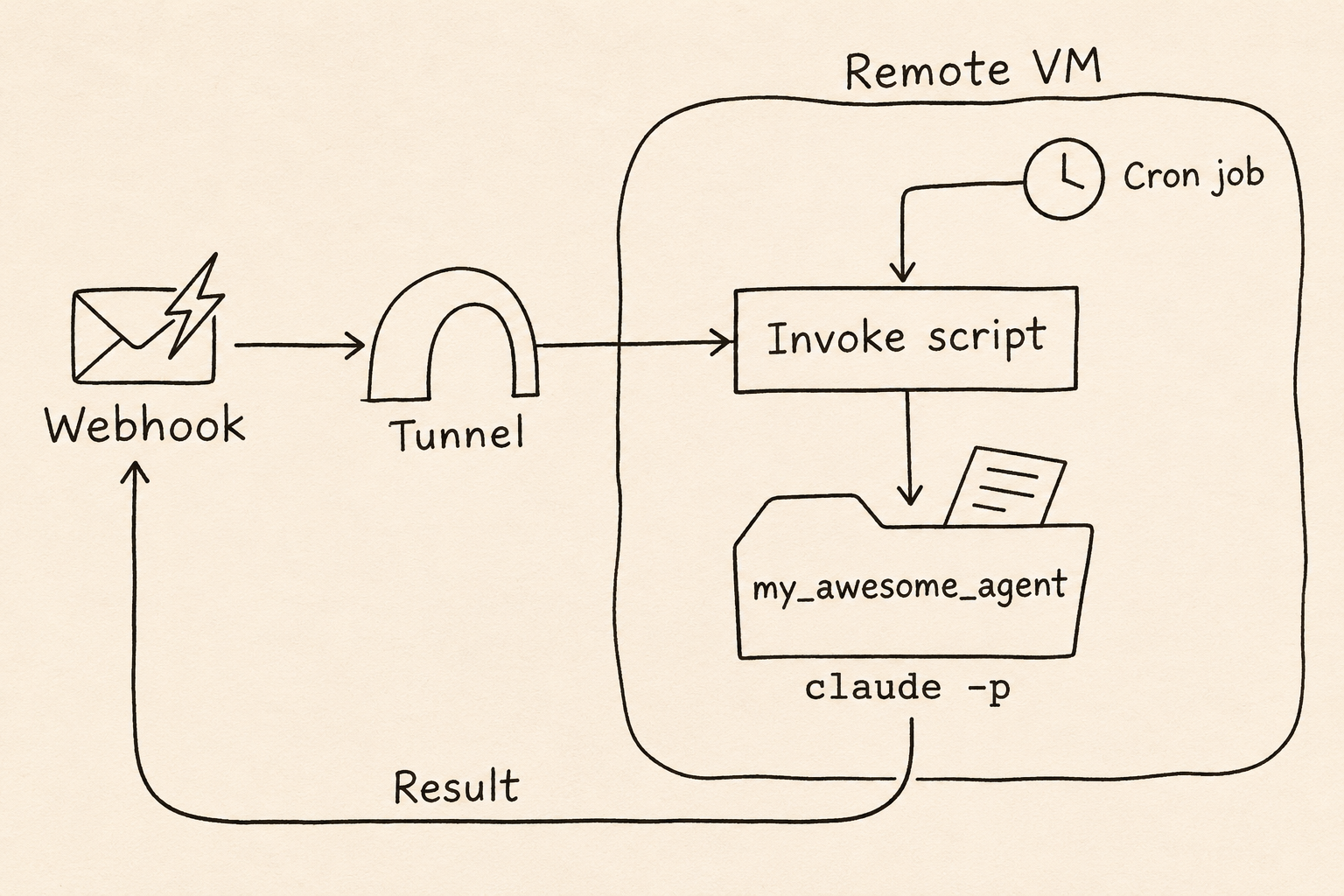
For an agent to be useful, it needs to be invoked as part of a workflow, whether by a cron job, a webhook event, or another program.
The simplicity is in the packaging. A folder with instructions is a clean deployable unit. It can be versioned, copied around, and embedded in other processes.
With Claude and the required tools and credentials available, it can be invoked headless using the -p flag:
cd my_awesome_agent
claude -p "Do awesome stuff"
Headless means there is no interactive chat. Claude receives the task, works in the agent's folder, prints the result, and exits. A script can pass in the task and collect the output. For unattended work, I configure the tool permissions in advance. Claude can also return structured JSON for another program to use.
Anthropic's documentation on headless execution covers the commands and configuration.
When the agent starts, it needs to know where to find its instructions, what input it has received, and whether it should resume previous work. The invocation mechanism can change without changing the fundamental purpose of the agent.
This setup can be deployed on a remote VM, with hooks triggering the agent and a tunnel providing access to a service that invokes it.
How does it know whether it has done a good job?
This is where things have drastically improved. I can now get things done with a single prompt, without elaborate instructions. Nowadays, I often just trust it to get on with the job. And I expect it to keep getting better.
When it gets something wrong, I go through it with Claude. What happened? What was missing? What should we change?
Claude saves local session transcripts under ~/.claude/projects/<project>/<session>.jsonl. Each transcript records the conversation, tool calls, and tool results. It provides a trace of how the task unfolded: what Claude was asked to do, what it tried, what came back from the tools, and where errors appeared.
Claude can then be pointed at the transcript and asked to analyze the run. Where did it go off track? Did it miss an instruction, lack context, or misinterpret a tool result? What evidence in the trace supports that explanation? That gives us something concrete to examine before deciding what to change.
If the lesson is reusable, we save it in the instructions, context, examples, or tests.
Over time, the agent improves. Not necessarily because its underlying model has changed, but because its working context and operating instructions have become better.
How do we know it is improving?
To be rigorous about the implementation, you need benchmarks: representative tasks with clear criteria for success. Running the same tasks lets you compare your agent across harnesses such as Gemini CLI, Codex, or pi, or across models such as Opus, Astra, Sol, and DeepSeek. It also tells you whether changes to your own setup are helping.
These tests are called evals. This is probably the hardest part of all of this. I will share my experiences with evals in a later post. In the meantime, these writeups explain them in much more depth:
- Hugo Bowne-Anderson: Does Your AI Agent Actually Work? A Guide to Evals
- Hamel Husain and Shreya Shankar: AI Evals: Everything You Need to Know
Orchestration
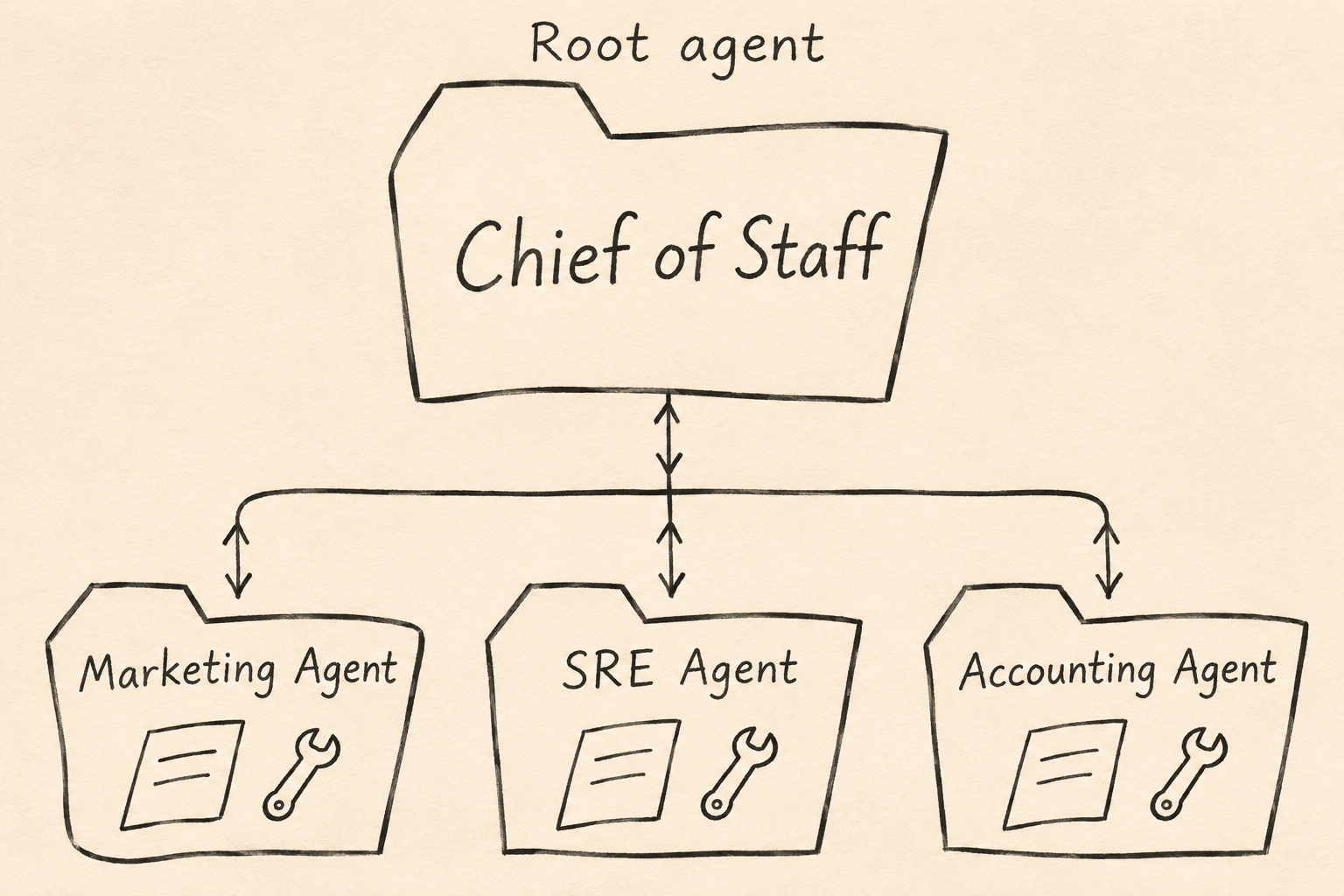
A task can be broken into smaller tasks and delegated to specialized subagents. In this setup, each subagent has its own folder under the main agent, containing its instructions, context, and tools.
The root agent acts as an orchestrator, or chief of staff. It decides which subagent to invoke, gives it a task, and brings the results together. For example, a chief-of-staff agent could coordinate all kinds of activity across a company, delegating work to specialist agents.
.claude/agents/.Making this concrete
I am using this setup to publish this website, including the article you are reading. For this project, I am using Codex.
The agent works in the website's project folder. AGENTS.md points it to my editorial guidance and publishing instructions. Those files capture my preferences and the steps for updating the site. Here is a shortened view of the actual folder:
claramap/
├── AGENTS.md
├── docs/
│   ├── editorial-memory.md
│   └── publishing.md
├── content/posts/
│   └── what-picasso-taught-me-about-building-ai-agents.md
├── public/assets/blog/
└── scripts/
    ├── build.mjs
    └── check-live.mjs
The agent is connected to Cloudflare through MCP, so it can deploy the site as part of the workflow.
For this article, I asked it to add the orchestration section and create the chief-of-staff diagram. It edited the Markdown, generated the illustration, built the site, deployed to Cloudflare, and checked the live page.
The publishing instructions also cover Google Analytics and discovery files. The build automatically updates the site's analytics tracking code for its current pages, regenerates llms.txt and llms-full.txt, and updates the RSS feed.
I review the result and correct it in the same conversation. Change the wording. Move a diagram. Make an image bigger. Reusable feedback goes back into the editorial memory, so future runs have better instructions to work with.
The Essence
This is the foundation. Everything else builds on this.
No need for OpenClaw, Hermes, Muse, LangChain, Pydantic, or any other agent framework. Solve the basic case first, then add machinery later. You can find leads, create content, publish, send emails, answer questions, fill out forms, or write code. Pick a job. Give it what it needs. Let it work.
Like Picasso's bull, my approach became simpler as I learned what to leave out. The progression looks something like this.